> ## Documentation Index
> Fetch the complete documentation index at: https://docs.testdino.com/llms.txt
> Use this file to discover all available pages before exploring further.
# Playwright Environment Mapping
> Map Git branches to TestDino environments with pattern matching and regex, so each test run reports against the right environment.
export const VideoSchema = ({name, description, thumbnailUrl, uploadDate, duration, contentUrl, embedUrl}) => {
const schema = {
"@context": "https://schema.org",
"@type": "VideoObject",
name,
description,
thumbnailUrl,
uploadDate,
...duration ? {
duration
} : {},
...contentUrl ? {
contentUrl
} : {},
...embedUrl ? {
embedUrl
} : {},
publisher: {
"@type": "Organization",
name: "TestDino",
logo: {
"@type": "ImageObject",
url: "https://docs.testdino.com/logo/light.svg"
}
}
};
return ;
};
Map Git branches to environments (Dev, Staging, Production) with exact names or regex patterns. TestDino routes each test run to the matching environment from the branch that triggered it.
Environments start on the **Pro** plan. Pro allows 3 environments, Team allows 10, and Enterprise is custom. See [Pricing](/pricing#plan-limits-at-a-glance).
## Add a mapping
1. Open **Project Settings → Branch Mapping**
2. Enter a **Name** and short **Label** (for example, `PROD`, `STAGE`, `DEV`)
3. Optionally set a **Description** and color
4. Add a **Branch pattern**: exact name (`main`) or regex (`^feature/`)
5. Save. Changes can take up to 2 minutes to apply
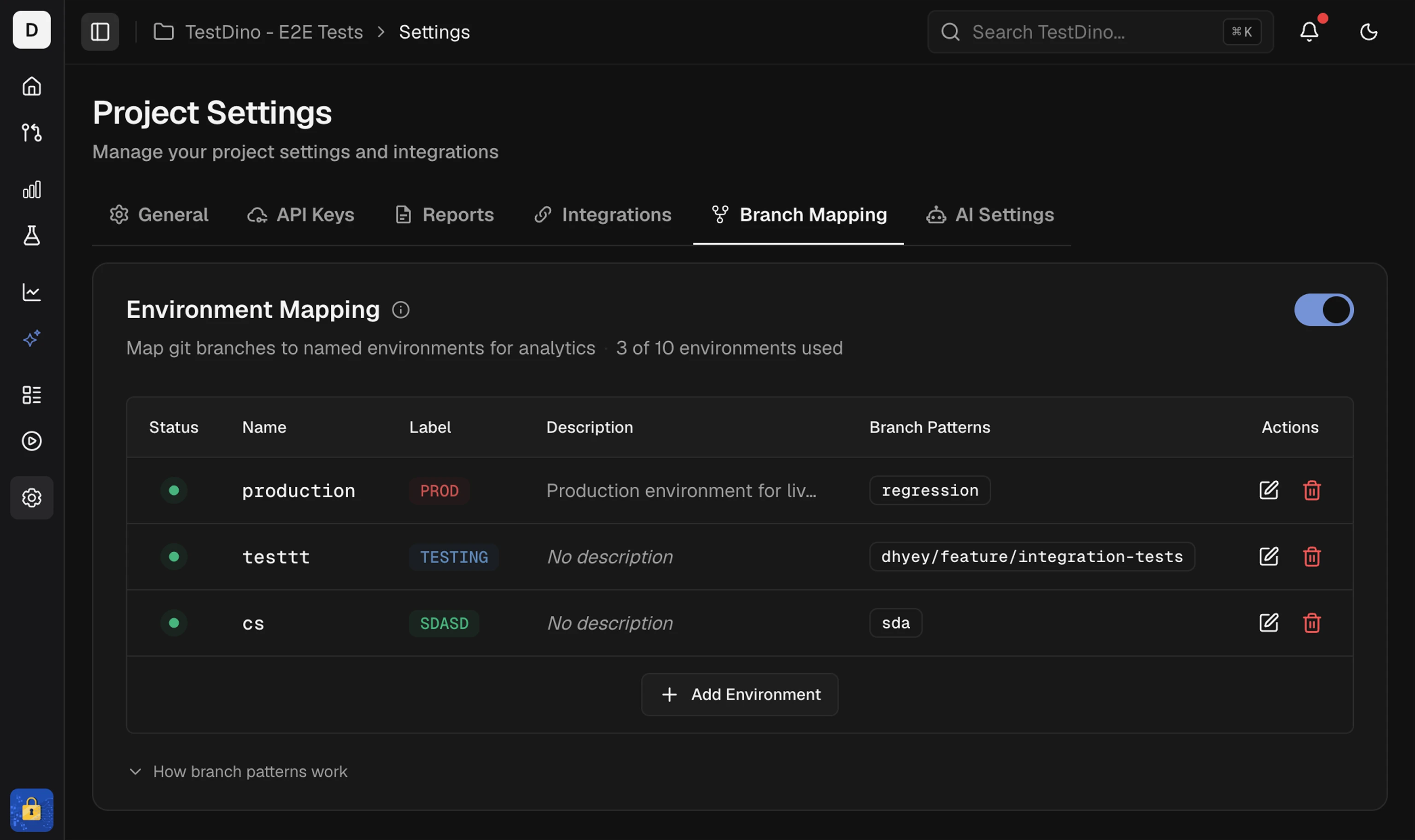 A branch pattern can belong to only one environment. Duplicate patterns across environments are not allowed. If `^feature/` is already on Development, you cannot add the same pattern to Staging.
When you run tests with `TESTDINO_TOKEN` set, TestDino reads the branch from git metadata and applies the matching pattern. No upload flag is required. See [Project Settings → Branch Mapping](/platform/project-settings#branch-mapping) for the UI fields.
## Pattern types
### Exact match
Match the branch name exactly as written.
| Pattern | Matches | Does not match |
| :- | :- | :- |
| `main` | `main` | `main-backup`, `feature/main` |
Use exact match for fixed names like `main`, `master`, or `production`.
### Regex patterns
| Pattern | Description | Matches |
| :- | :- | :- |
| `^dev/` | Starts with `dev/` | `dev/feature-123`, `dev/bug-fix` |
| `^main$` | Exactly `main` | `main` |
| `^(main\|master)$` | Either `main` or `master` | `main`, `master` |
| `^release/v\d+` | Release with version | `release/v1`, `release/v2.0` |
## Common patterns
### Branch prefixes
| Pattern | Description | Matches |
| :- | :- | :- |
| `^feature/` | Feature branches | `feature/login`, `feature/payment` |
| `^hotfix/` | Hotfix branches | `hotfix/critical-bug` |
| `^release/` | Release branches | `release/v1.0`, `release/2024-01` |
| `^pull/\d+` | GitHub PR branches | `pull/123/merge`, `pull/456/head` |
### Version numbers
| Pattern | Description | Matches |
| :- | :- | :- |
| `^release/v\d+` | Version with `v` prefix | `release/v1`, `release/v2.0` |
| `^release/\d+\.\d+` | Semantic version | `release/1.0`, `release/2.5` |
| `^release/v\d+\.\d+\.\d+$` | Exact semver | `release/v1.0.0` |
### Case-insensitive
Use `(?i)` when casing is inconsistent:
| Pattern | Matches |
| :- | :- |
| `(?i)^main$` | `main`, `MAIN`, `Main` |
| `(?i)^release/` | `release/`, `RELEASE/`, `Release/` |
## Common use cases
### Git Flow
| Environment | Pattern |
| :- | :- |
| Production | `^(main\|master)$` |
| Staging | `^(staging\|stage)$` |
| Development | `^(dev\|develop)$` |
| Features | `^feature/` |
| Hotfixes | `^hotfix/` |
| Releases | `^release/` |
### Environment prefixes
| Environment | Pattern |
| :- | :- |
| Production | `^prod/` |
| Staging | `^stg/` |
| QA | `^qa/` |
| Development | `^dev/` |
### Version releases
| Environment | Pattern |
| :- | :- |
| Production | `^release/v\d+\.\d+\.\d+$` |
| Release Candidates | `^release/v\d+\.\d+\.\d+-rc\d+$` |
| Beta | `^release/v\d+\.\d+\.\d+-beta$` |
## Regex symbols reference
| Symbol | Meaning | Example | Matches |
| :- | :- | :- | :- |
| `^` | Start of branch name | `^dev` | `dev/feature` ✓, `my-dev` ✗ |
| `$` | End of branch name | `main$` | `main` ✓, `main-old` ✗ |
| `(?i)` | Case-insensitive | `(?i)^main$` | `main`, `MAIN` ✓ |
| `.` | Any single character | `dev.` | `dev/`, `dev-`, `dev1` |
| `*` | Zero or more of previous | `dev.*` | `dev`, `dev/feature` |
| `+` | One or more of previous | `dev.+` | `dev/feature` ✓, `dev` ✗ |
| `\d` | Any digit (0-9) | `v\d` | `v1`, `v2`, `v9` |
| `\|` | OR | `dev\|qa` | `dev`, `qa` |
| `[ ]` | Any character in brackets | `[0-9]` | `0`–`9` |
| `( )` | Group patterns | `^(dev\|qa)/` | `dev/test`, `qa/test` |
| `[^ ]` | NOT in brackets | `[^0-9]` | `a`, `b`, `-` (not digits) |
Test patterns on [regex101.com](https://regex101.com/) before saving.
## Best practices
### Do
| Practice | Good | Bad |
| :- | :- | :- |
| Anchor at start | `^dev/` | `dev/` (matches anywhere) |
| Use `$` for exact | `^main$` | `^main` (matches `main-old`) |
| Test patterns first | Use [regex101.com](https://regex101.com/) | Deploy untested |
| Use `(?i)` for case | `(?i)^release/` | `^[Rr][Ee][Ll]...` |
### Avoid
| Pattern | Problem |
| :- | :- |
| `.*` | Matches everything |
| `.+` | Matches any branch |
| `dev*` | Matches `d`, `de`, `dev` |
| `dev;echo` | Security risk (special characters) |
| Same pattern on 2 environments | Not allowed. Each pattern maps to one environment only |
### Validation
**Errors** (blocks saving):
* Invalid characters (`;`, `&`, `` ` ``, `"`, `'`, `<`, `>`, `%`) or invalid regex syntax (unclosed brackets, invalid escapes)
* Duplicate branch pattern already used on another environment in the same project
**Warnings** (allows saving): unanchored patterns that may match more than intended.
## Testing patterns
### Example: `^dev/`
| Branch | Match | Reason |
| :- | :- | :- |
| `dev/feature-login` | ✓ | Starts with `dev/` |
| `dev/bug-fix` | ✓ | Starts with `dev/` |
| `development/test` | ✗ | Starts with `development/` |
| `my-dev/branch` | ✗ | Does not start with `dev/` |
### Example: `^release/v\d+\.\d+`
| Branch | Match | Reason |
| :- | :- | :- |
| `release/v1.0` | ✓ | Matches pattern |
| `release/v2.5.3` | ✓ | Matches pattern (and more) |
| `release/version1.0` | ✗ | Missing `v` before number |
| `release/beta` | ✗ | No version number |
## Assign the environment
Results stream to TestDino during the run. The branch that triggered the run maps to an environment through the rules above, so no upload flag is needed. See the [Node.js CLI](/cli/testdino-playwright-nodejs) for setup.
Configure branch mapping in the project
Stream results with branch metadata
CI workflow setup
Filter dashboards by environment
This documentation is built and hosted on [Mintlify](https://mintlify.com), a developer documentation platform.
A branch pattern can belong to only one environment. Duplicate patterns across environments are not allowed. If `^feature/` is already on Development, you cannot add the same pattern to Staging.
When you run tests with `TESTDINO_TOKEN` set, TestDino reads the branch from git metadata and applies the matching pattern. No upload flag is required. See [Project Settings → Branch Mapping](/platform/project-settings#branch-mapping) for the UI fields.
## Pattern types
### Exact match
Match the branch name exactly as written.
| Pattern | Matches | Does not match |
| :- | :- | :- |
| `main` | `main` | `main-backup`, `feature/main` |
Use exact match for fixed names like `main`, `master`, or `production`.
### Regex patterns
| Pattern | Description | Matches |
| :- | :- | :- |
| `^dev/` | Starts with `dev/` | `dev/feature-123`, `dev/bug-fix` |
| `^main$` | Exactly `main` | `main` |
| `^(main\|master)$` | Either `main` or `master` | `main`, `master` |
| `^release/v\d+` | Release with version | `release/v1`, `release/v2.0` |
## Common patterns
### Branch prefixes
| Pattern | Description | Matches |
| :- | :- | :- |
| `^feature/` | Feature branches | `feature/login`, `feature/payment` |
| `^hotfix/` | Hotfix branches | `hotfix/critical-bug` |
| `^release/` | Release branches | `release/v1.0`, `release/2024-01` |
| `^pull/\d+` | GitHub PR branches | `pull/123/merge`, `pull/456/head` |
### Version numbers
| Pattern | Description | Matches |
| :- | :- | :- |
| `^release/v\d+` | Version with `v` prefix | `release/v1`, `release/v2.0` |
| `^release/\d+\.\d+` | Semantic version | `release/1.0`, `release/2.5` |
| `^release/v\d+\.\d+\.\d+$` | Exact semver | `release/v1.0.0` |
### Case-insensitive
Use `(?i)` when casing is inconsistent:
| Pattern | Matches |
| :- | :- |
| `(?i)^main$` | `main`, `MAIN`, `Main` |
| `(?i)^release/` | `release/`, `RELEASE/`, `Release/` |
## Common use cases
### Git Flow
| Environment | Pattern |
| :- | :- |
| Production | `^(main\|master)$` |
| Staging | `^(staging\|stage)$` |
| Development | `^(dev\|develop)$` |
| Features | `^feature/` |
| Hotfixes | `^hotfix/` |
| Releases | `^release/` |
### Environment prefixes
| Environment | Pattern |
| :- | :- |
| Production | `^prod/` |
| Staging | `^stg/` |
| QA | `^qa/` |
| Development | `^dev/` |
### Version releases
| Environment | Pattern |
| :- | :- |
| Production | `^release/v\d+\.\d+\.\d+$` |
| Release Candidates | `^release/v\d+\.\d+\.\d+-rc\d+$` |
| Beta | `^release/v\d+\.\d+\.\d+-beta$` |
## Regex symbols reference
| Symbol | Meaning | Example | Matches |
| :- | :- | :- | :- |
| `^` | Start of branch name | `^dev` | `dev/feature` ✓, `my-dev` ✗ |
| `$` | End of branch name | `main$` | `main` ✓, `main-old` ✗ |
| `(?i)` | Case-insensitive | `(?i)^main$` | `main`, `MAIN` ✓ |
| `.` | Any single character | `dev.` | `dev/`, `dev-`, `dev1` |
| `*` | Zero or more of previous | `dev.*` | `dev`, `dev/feature` |
| `+` | One or more of previous | `dev.+` | `dev/feature` ✓, `dev` ✗ |
| `\d` | Any digit (0-9) | `v\d` | `v1`, `v2`, `v9` |
| `\|` | OR | `dev\|qa` | `dev`, `qa` |
| `[ ]` | Any character in brackets | `[0-9]` | `0`–`9` |
| `( )` | Group patterns | `^(dev\|qa)/` | `dev/test`, `qa/test` |
| `[^ ]` | NOT in brackets | `[^0-9]` | `a`, `b`, `-` (not digits) |
Test patterns on [regex101.com](https://regex101.com/) before saving.
## Best practices
### Do
| Practice | Good | Bad |
| :- | :- | :- |
| Anchor at start | `^dev/` | `dev/` (matches anywhere) |
| Use `$` for exact | `^main$` | `^main` (matches `main-old`) |
| Test patterns first | Use [regex101.com](https://regex101.com/) | Deploy untested |
| Use `(?i)` for case | `(?i)^release/` | `^[Rr][Ee][Ll]...` |
### Avoid
| Pattern | Problem |
| :- | :- |
| `.*` | Matches everything |
| `.+` | Matches any branch |
| `dev*` | Matches `d`, `de`, `dev` |
| `dev;echo` | Security risk (special characters) |
| Same pattern on 2 environments | Not allowed. Each pattern maps to one environment only |
### Validation
**Errors** (blocks saving):
* Invalid characters (`;`, `&`, `` ` ``, `"`, `'`, `<`, `>`, `%`) or invalid regex syntax (unclosed brackets, invalid escapes)
* Duplicate branch pattern already used on another environment in the same project
**Warnings** (allows saving): unanchored patterns that may match more than intended.
## Testing patterns
### Example: `^dev/`
| Branch | Match | Reason |
| :- | :- | :- |
| `dev/feature-login` | ✓ | Starts with `dev/` |
| `dev/bug-fix` | ✓ | Starts with `dev/` |
| `development/test` | ✗ | Starts with `development/` |
| `my-dev/branch` | ✗ | Does not start with `dev/` |
### Example: `^release/v\d+\.\d+`
| Branch | Match | Reason |
| :- | :- | :- |
| `release/v1.0` | ✓ | Matches pattern |
| `release/v2.5.3` | ✓ | Matches pattern (and more) |
| `release/version1.0` | ✗ | Missing `v` before number |
| `release/beta` | ✗ | No version number |
## Assign the environment
Results stream to TestDino during the run. The branch that triggered the run maps to an environment through the rules above, so no upload flag is needed. See the [Node.js CLI](/cli/testdino-playwright-nodejs) for setup.
Configure branch mapping in the project
Stream results with branch metadata
CI workflow setup
Filter dashboards by environment
This documentation is built and hosted on [Mintlify](https://mintlify.com), a developer documentation platform.