> ## Documentation Index
> Fetch the complete documentation index at: https://docs.testdino.com/llms.txt
> Use this file to discover all available pages before exploring further.
# TestDino CircleCI Orb Setup
> Upload Playwright results from CircleCI to TestDino using the official TestDino Orb. Single-step integration.
Set up CircleCI to upload Playwright test results to TestDino using the TestDino Orb , a prebuilt package that wraps the TestDino CLI so you don't need to install it separately.
**Recommendation**
For more configuration options and the latest features, use the [TestDino CLI approach](/guides/playwright-circle-ci-cli) instead. The Orb wraps the CLI but may not include all new updates immediately.
## Pick an upload mode
The orb supports 4 upload modes. Pick one based on what you want in the dashboard.
| Mode | Uploads | Use it when |
| :- | :- | :- |
| [Basic Upload](#basic-upload) | The JSON results file | You only need pass/fail data and trends |
| [Upload with HTML Report](#upload-with-html-report) | JSON plus the Playwright HTML report | You want the HTML report attached to the run |
| [Upload Full Bundle](#upload-full-bundle) | JSON, images, and videos | You need screenshots and videos for failure debugging |
| [Upload with Custom Paths](#upload-with-custom-paths) | Whatever paths you name | Your reports are not in the default locations |
## Prerequisites
* A TestDino account with a project created
* A TestDino API key ([Generate API Keys](/guides/generate-api-keys))
* TestDino Example Repository for sample tests and ready-to-use CI configs
* A CircleCI account with access to your repository
* Playwright configured with JSON and HTML reporters in `playwright.config.js`:
```javascript playwright.config.js theme={null}
// ...existing config
reporter: [
['html', { outputDir: './playwright-report' }], // Optional
['json', { outputFile: './playwright-report/report.json' }], // ✅ Required
]
```
## Add the Environment Variable
1. Open your project in CircleCI
2. Go to **Project Settings → Environment Variables**
3. Click **Add Environment Variable**
4. Set the name to `TESTDINO_TOKEN`
5. Paste your TestDino API key as the value
6. Save the variable
**Warning**
Never commit your API key directly in config files. Always use environment variables.
## Basic Upload
```yaml .circleci/config.yml theme={null}
version: '2.1'
orbs:
testdino: testdino/testdino@1.0.0
jobs:
run-tests:
docker:
- image: mcr.microsoft.com/playwright:v1.40.0-focal
steps:
- checkout
- run:
command: npm ci
name: Install dependencies
- run:
command: npx playwright test
name: Run Playwright tests
- testdino/upload-report:
report_directory: ./playwright-report
token: TESTDINO_TOKEN
workflows:
test-and-upload:
jobs:
- run-tests
```
## Upload with HTML Report
```yaml .circleci/config.yml theme={null}
version: '2.1'
orbs:
testdino: testdino/testdino@1.0.0
jobs:
upload-with-html:
docker:
- image: mcr.microsoft.com/playwright:v1.40.0-focal
steps:
- checkout
- run:
command: npm ci
name: Install dependencies
- run:
command: npx playwright test
name: Run Playwright tests
- testdino/upload-report:
report_directory: ./playwright-report
token: TESTDINO_TOKEN
upload_html: true
verbose: true
- store_artifacts:
destination: playwright-report
path: ./playwright-report
workflows:
test-with-testdino:
jobs:
- upload-with-html:
context: testdino-credentials
```
## Upload Full Bundle
Include all artifacts (JSON, images, videos) in one upload.
```yaml .circleci/config.yml theme={null}
version: '2.1'
orbs:
testdino: testdino/testdino@1.0.0
jobs:
upload-full-bundle:
docker:
- image: mcr.microsoft.com/playwright:v1.40.0-focal
steps:
- checkout
- run:
command: npm ci
name: Install dependencies
- run:
command: npx playwright test
name: Run Playwright tests
- testdino/upload-report:
report_directory: ./playwright-report
token: TESTDINO_TOKEN
upload_full_json: true
verbose: true
workflows:
test-with-testdino:
jobs:
- upload-full-bundle:
context: testdino-credentials
```
## Upload with Custom Paths
Specify custom report paths and include images and videos.
```yaml .circleci/config.yml theme={null}
version: '2.1'
orbs:
testdino: testdino/testdino@1.0.0
jobs:
upload-with-custom-paths:
docker:
- image: mcr.microsoft.com/playwright:v1.40.0-focal
steps:
- checkout
- run:
command: npm ci
name: Install dependencies
- run:
command: npx playwright test
name: Run Playwright tests
- testdino/upload-report:
report_directory: ./test-results
json_report: ./test-results/results.json
html_report: ./test-results/index.html
token: TESTDINO_TOKEN
upload_images: true
upload_videos: true
workflows:
test-with-testdino:
jobs:
- upload-with-custom-paths:
context: testdino-credentials
```
## Orb Parameters
| Parameter | Required | Description |
| :- | :- | :- |
| `report_directory` | Yes | Path to the Playwright report directory |
| `token` | Yes | CircleCI environment variable name holding the TestDino API key |
| `upload_html` | No | Upload HTML report (`true` / `false`) |
| `upload_full_json` | No | Upload full JSON bundle with all artifacts |
| `upload_images` | No | Upload screenshot attachments |
| `upload_videos` | No | Upload video recordings |
| `json_report` | No | Custom path to JSON report file |
| `html_report` | No | Custom path to HTML report file |
| `verbose` | No | Enable verbose logging output |
**Tip**
Use [CircleCI contexts](https://circleci.com/docs/contexts/) (e.g., `testdino-credentials`) to manage secrets across multiple jobs without repeating environment variable setup.
## Container Parallelism
For larger test suites, CircleCI parallelism splits tests across multiple containers. Each container uploads its own report, and TestDino groups them into one run when they share a `ci-run-id`.
### How it works
1. CircleCI runs Playwright across 4 containers using `parallelism: 4`
2. Each container writes its results to its own report directory
3. The orb uploads each report with the same `ci_run_id` so TestDino merges them into a single run
4. No merge job runs after the containers finish
### Full sharded config
```yaml .circleci/config.yml theme={null}
version: '2.1'
orbs:
testdino: testdino/testdino@1.0.0
jobs:
run-tests:
docker:
- image: mcr.microsoft.com/playwright:v1.40.0-focal
parallelism: 4
steps:
- checkout
- run:
command: npm ci
name: Install dependencies
- run:
command: |
npx playwright test \
--shard=$((CIRCLE_NODE_INDEX + 1))/$CIRCLE_NODE_TOTAL
name: Run shard
- testdino/upload-report:
report_directory: ./playwright-report
token: TESTDINO_TOKEN
ci_run_id: $CIRCLE_WORKFLOW_ID
workflows:
test-and-upload:
jobs:
- run-tests
```
### Key details
| Config Block | What It Does |
| :- | :- |
| `parallelism: 4` | Runs 4 shard containers in parallel |
| `--shard=$((CIRCLE_NODE_INDEX + 1))/$CIRCLE_NODE_TOTAL` | CircleCI uses 0-based indexing, Playwright uses 1-based |
| `ci_run_id: $CIRCLE_WORKFLOW_ID` | Groups all shards into one run on the dashboard |
| `token: TESTDINO_TOKEN` | Names the environment variable holding the TestDino API key |
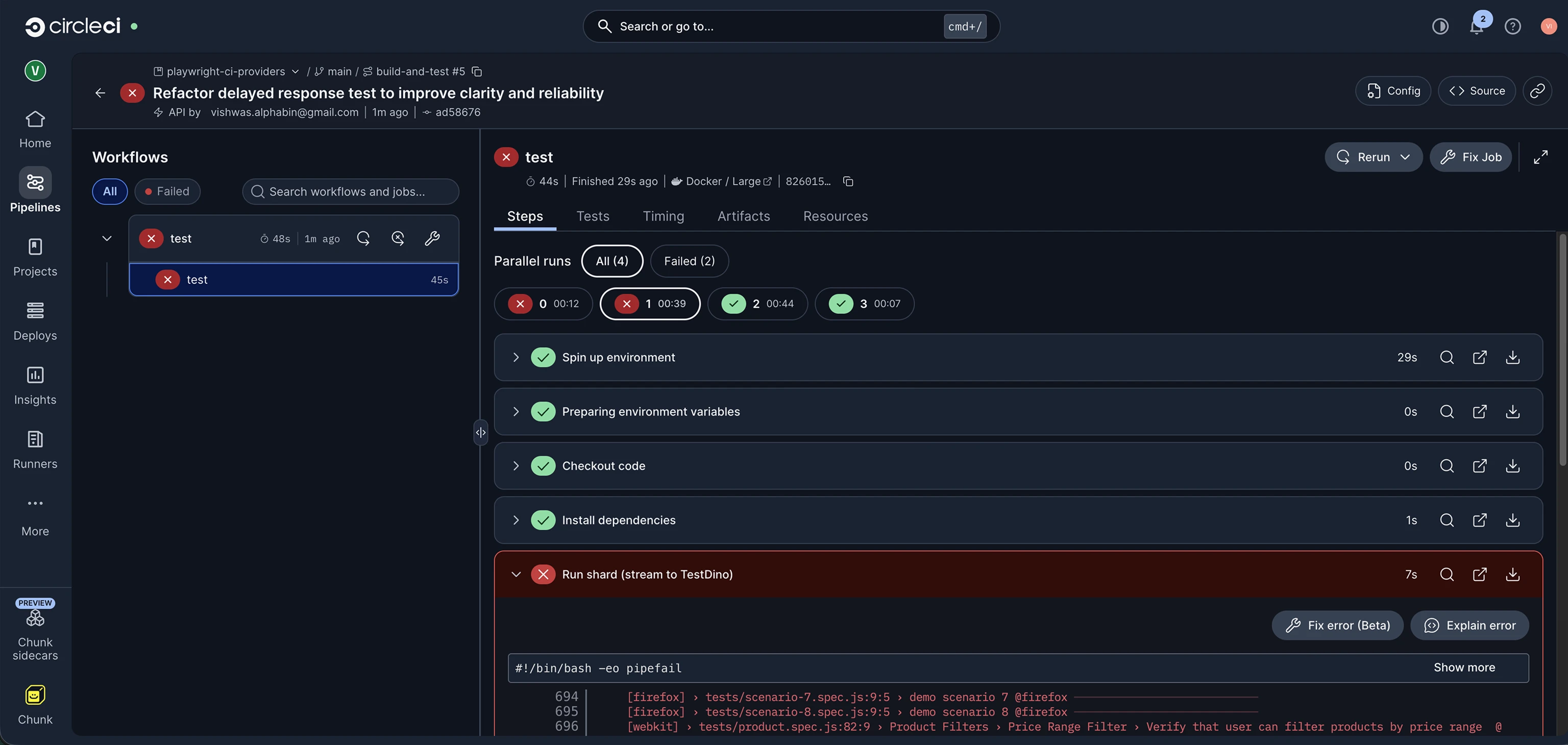
### Pipeline execution
After the workflow runs, CircleCI shows all shard containers in the pipeline view. Each container uploads its report, and TestDino merges them into one run.
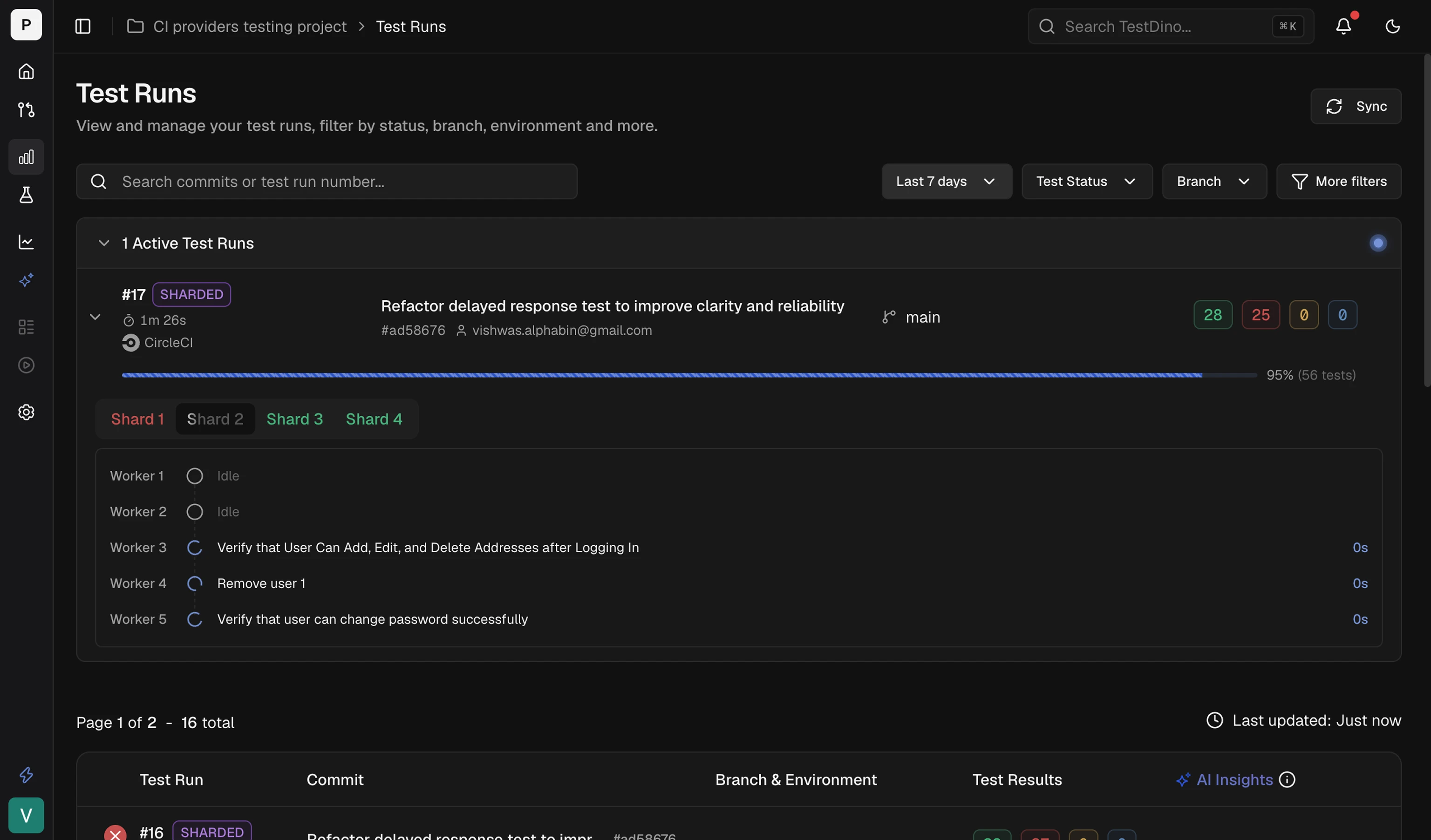
 ### Results in TestDino
The test run appears in your TestDino dashboard with full failure details, flaky detection, and trend data once the shards finish uploading.
### Results in TestDino
The test run appears in your TestDino dashboard with full failure details, flaky detection, and trend data once the shards finish uploading.
 ## Troubleshooting
Ensure the orb is imported correctly: `testdino: testdino/testdino@1.0.0`. Check the [CircleCI Orb Registry](https://circleci.com/developer/orbs/orb/testdino/testdino) for the latest version.
Pass the same `ci_run_id: $CIRCLE_WORKFLOW_ID` to every shard container. Different values create one run per shard.
Confirm the environment variable is set in **CircleCI → Project Settings → Environment Variables**. If using contexts, verify the job references the correct context name.
## Related
Reduce CI time with smart reruns
Route test results to Dev, Staging, or Production by branch
Connect Slack, Jira, Linear, Asana, and more
Access test results and fix issues with AI agents
This documentation is built and hosted on [Mintlify](https://mintlify.com), a developer documentation platform.
## Troubleshooting
Ensure the orb is imported correctly: `testdino: testdino/testdino@1.0.0`. Check the [CircleCI Orb Registry](https://circleci.com/developer/orbs/orb/testdino/testdino) for the latest version.
Pass the same `ci_run_id: $CIRCLE_WORKFLOW_ID` to every shard container. Different values create one run per shard.
Confirm the environment variable is set in **CircleCI → Project Settings → Environment Variables**. If using contexts, verify the job references the correct context name.
## Related
Reduce CI time with smart reruns
Route test results to Dev, Staging, or Production by branch
Connect Slack, Jira, Linear, Asana, and more
Access test results and fix issues with AI agents
This documentation is built and hosted on [Mintlify](https://mintlify.com), a developer documentation platform.