> ## Documentation Index
> Fetch the complete documentation index at: https://docs.testdino.com/llms.txt
> Use this file to discover all available pages before exploring further.
# Playwright Test Runs
> Browse Playwright test runs in TestDino, filter by tag or status, and open a run to see its header, columns, and shard breakdown.
export const VideoSchema = ({name, description, thumbnailUrl, uploadDate, duration, contentUrl, embedUrl}) => {
const schema = {
"@context": "https://schema.org",
"@type": "VideoObject",
name,
description,
thumbnailUrl,
uploadDate,
...duration ? {
duration
} : {},
...contentUrl ? {
contentUrl
} : {},
...embedUrl ? {
embedUrl
} : {},
publisher: {
"@type": "Organization",
name: "TestDino",
logo: {
"@type": "ImageObject",
url: "https://docs.testdino.com/logo/light.svg"
}
}
};
return ;
};
The Test Runs page lists every Playwright test run in your project. Filter the list, open a run, and use the detail tabs for evidence and AI insights.
## Open a run
1. Filter by time, environment, branch, status, or tags
2. Scan result counts and open a run that needs action
3. Use the detail tabs:
| Tab | What it shows |
| :- | :- |
| [Summary](/platform/test-runs/playwright-failure-summary) | Failed, flaky, and skipped groups with detailed analysis |
| [Specs](/platform/playwright-test-runs/specs) | Results by spec file |
| [Errors](/platform/playwright-test-runs/errors) | Failures grouped by error message |
| [Configuration](/platform/playwright-test-runs/configuration) | Source, CI, system, and Playwright config |
| [Coverage](/platform/playwright-test-runs/coverage) | Per-run code coverage |
| [AI Insights](/platform/playwright-test-runs/ai-insights) | Per-run failure classification |
## Search and filters
| Control | Purpose |
| :- | :- |
| **Search** | Commit message or run number (for example, `#1493`) |
| **Time Period** | Last 7, 14, or 28 days, Last 3 or 6 months, or Custom |
| **Status** | Filter by run status or by test-case outcome, on 2 tabs (see below) |
| **Duration** | Sort low to high or high to low |
| **Author** | One or more authors |
| **Environment** | Mapped environments |
| **Branch** | One or more branches |
| **Re-runs** | **Only re-runs** or **Hide re-runs**. Without it, the list shows both |
| **Tags** | **Test Run** tags (`tdpw --tags`, `TESTDINO_TAGS`, or config) or **Test Case** tags (Playwright `tag` metadata). By default, a run matches if it has any of the selected tags. Turn on **Match exact tags only** to show only runs whose tags are exactly the selected set, with no extras. |
The **Status** filter has 2 tabs, and you can select from either or both:
| Tab | Options | Matches |
| :- | :- | :- |
| **Test Run** | Passed, Failed, Interrupted, Incomplete | The run's overall status, as its badge shows it. Incomplete also covers a finished test run where some test results never arrived. |
| **Test Case** | Passed, Failed, Flaky, Skipped, Interrupted, Incomplete | Runs that contain a test case with that outcome |
Use the Test Case tab to find runs with a **flaky** or **skipped** test, which the run-level status does not surface on its own.
### Active test runs
Runs still executing appear in **Active Test Runs** at the top, with a live progress bar and pass/fail/skip counts. Sharded runs show a **SHARDED** label and per-shard tabs. Runs assembled from separate CI jobs show a **SPLITTED** label, a progress bar segmented per split, and per-split tabs.
## Run list columns
| Column | Description |
| :- | :- |
| Test Run | Run ID, start time, and executor (CI or Local). CI label opens the job. A re-run adds **Re-run of #N**, linking to the original test run. |
| Commit | Message, short SHA, and author. Links to the Git host. |
| Branch & Environment | Branch, mapped environment, and run-level tag chips (`+N` when truncated) |
| Test Results | Passed, Failed, Flaky, Skipped, Interrupted, and total |
## Run-level tags
Label an entire run with `--tags` on `tdpw test`. These are separate from test-case tags set via [annotations](/guides/playwright-test-annotations).
```bash theme={null}
npx tdpw test -t "$TESTDINO_TOKEN" --tags "regression,smoke"
```
You passed `--tags` to `npx playwright test`. Playwright does not define that flag, so it exits before the test run starts.
Use the TestDino wrapper:
```bash theme={null}
npx tdpw test -t "$TESTDINO_TOKEN" --tags "regression,smoke"
```
To keep `npx playwright test`, set `tags` in the reporter options. `TESTDINO_TAGS` and `testdino.config.ts` are read by `tdpw` only. Learn how to set run labels in [Run-level tags](/cli/testdino-playwright-nodejs#run-level-tags).
| Tag type | Set via | Scope |
| :- | :- | :- |
| Run-level | `tdpw --tags`, `TESTDINO_TAGS`, or config | Entire test run |
| Test-case-level | Playwright `tag` metadata and [annotations](/guides/playwright-test-annotations) | Individual test cases |
## Run detail header
| Element | Description |
| :- | :- |
| Commit message | Message and run number |
| Environment / Branch | Mapped environment badge and branch name |
| Commit SHA / Author | Short SHA (links to Git host) and committer |
| Timestamp / Duration | Start time and total run time |
| Tags | Run-level chips (same labels as `tdpw --tags`) |
| `RE-RUN OF #N` badge | On a re-run, next to the run number. Links to the original test run. Reads `RE-RUN` when the original is no longer available. |
| Re-run | Runs only this test run's failed or flaky test cases, on the same commit or the latest code. Shown once the test run has finished with at least 1 failed or flaky test case. See [Re-run failed Playwright tests](/guides/debug-playwright-failures/rerun-failed-tests). |
| Debug with AI | Hands the test run to your AI assistant. See [Debug with AI](/guides/debug-playwright-failures/debug-with-ai). |
| Print / Export | In the `...` menu beside Debug with AI. Builds a shareable PDF of the run. See [Print and export a test run report](/platform/playwright-test-runs/print-export). |
| Post PR comment | In the `...` menu beside Debug with AI. |
## Re-runs
A test run that has been re-run shows a row under its header with its latest re-run: the run number colored by status, the test case counts, the total, and when it started. With more than 1 re-run, **View all N** opens a table of them with Run, Results, Total, and Started columns, newest first. The table holds the 20 most recent and says so when there are more.
A re-run inside the original GitHub run is labeled with its GitHub attempt, such as `Attempt 2`. When its retried jobs report as separate test runs, each carries the same label with the job count, such as `Attempt 2 · 3 jobs`.
A re-run is left out of run-level figures: test run count, pass rate, and average duration. Its test cases still count in test-level views, and it is billed like any test run.
Learn how to start one in [Re-run failed Playwright tests](/guides/debug-playwright-failures/rerun-failed-tests).
## Shards breakdown
Sharded runs (`--shard`) show a **Shards** section on Summary. Pass the same `--ci-run-id` to every shard so TestDino merges them into one run. Setup: [Node.js CLI → Sharded runs](/cli/testdino-playwright-nodejs#sharded-runs).
| Column | Shows |
| :- | :- |
| Shard | Number, status, and **Slowest** tag when applicable |
| Duration | Shard runtime |
| Breakdown | Pass / fail / flaky / skipped mix |
| Test results | Totals per outcome |
After the run finishes, imbalance (for example `3.0×`) compares slowest to fastest shard. A failure-concentration note appears when one shard holds most failures. Click shard rows to filter Detailed Analysis to those shards.
## Splits breakdown
Runs assembled from separate CI jobs (`--split`) carry a **SPLITTED** badge and show a **Splits** section on Summary in place of Shards. Learn how to set the jobs up in [Split mode](/guides/playwright-split-mode).
| Column | Shows |
| :- | :- |
| Split | Number, status, and duration bar |
| Duration | Split runtime |
| Breakdown | Pass / fail / flaky / skipped mix |
| Test results | Totals per outcome |
A split that used `--shard` expands to a per-shard table, and Split and Shard act as independent filters. If 2 splits reported the same test cases, the panel warns that per-split counts may be unreliable: split statuses stay accurate while totals become approximate.
Failures and flakiness by cause
Group failures by error message
Evidence and AI analysis per test
This documentation is built and hosted on [Mintlify](https://mintlify.com), a developer documentation platform.
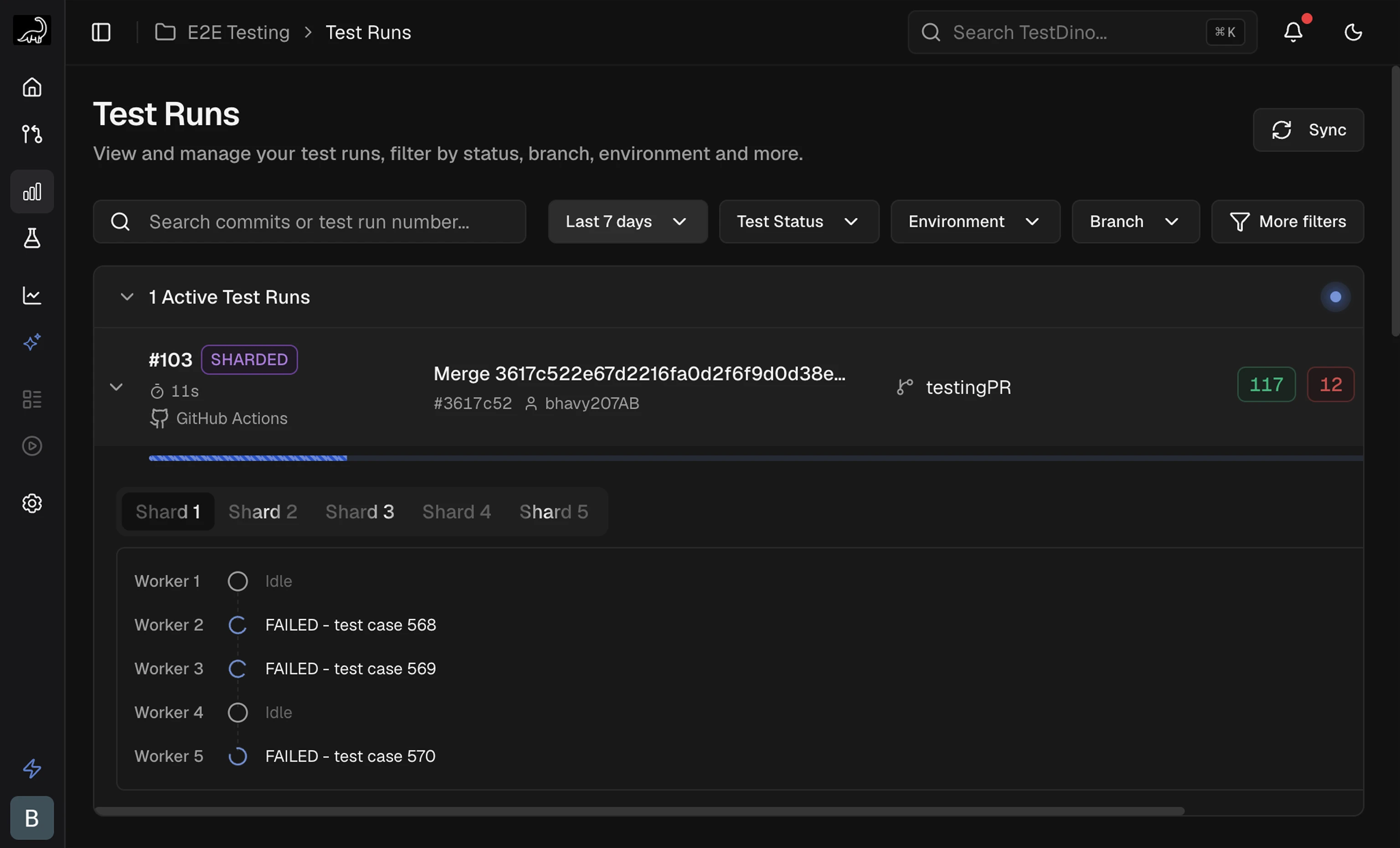 ## Run list columns
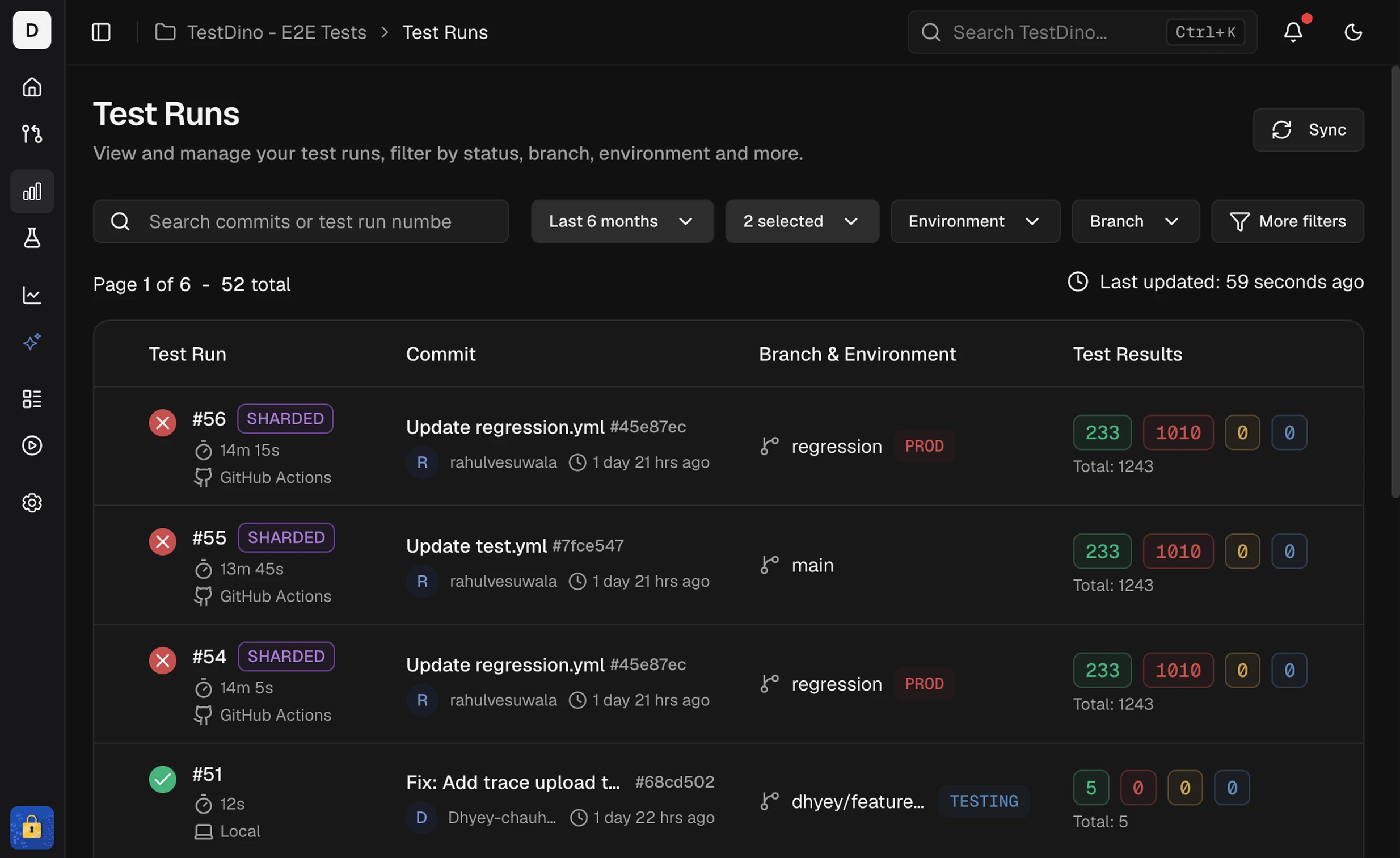 | Column | Description |
| :- | :- |
| Test Run | Run ID, start time, and executor (CI or Local). CI label opens the job. A re-run adds **Re-run of #N**, linking to the original test run. |
| Commit | Message, short SHA, and author. Links to the Git host. |
| Branch & Environment | Branch, mapped environment, and run-level tag chips (`+N` when truncated) |
| Test Results | Passed, Failed, Flaky, Skipped, Interrupted, and total |
## Run-level tags
Label an entire run with `--tags` on `tdpw test`. These are separate from test-case tags set via [annotations](/guides/playwright-test-annotations).
```bash theme={null}
npx tdpw test -t "$TESTDINO_TOKEN" --tags "regression,smoke"
```
| Column | Description |
| :- | :- |
| Test Run | Run ID, start time, and executor (CI or Local). CI label opens the job. A re-run adds **Re-run of #N**, linking to the original test run. |
| Commit | Message, short SHA, and author. Links to the Git host. |
| Branch & Environment | Branch, mapped environment, and run-level tag chips (`+N` when truncated) |
| Test Results | Passed, Failed, Flaky, Skipped, Interrupted, and total |
## Run-level tags
Label an entire run with `--tags` on `tdpw test`. These are separate from test-case tags set via [annotations](/guides/playwright-test-annotations).
```bash theme={null}
npx tdpw test -t "$TESTDINO_TOKEN" --tags "regression,smoke"
```