

Environments start on the Pro plan. Pro allows 3 environments, Team allows 10, and Enterprise is custom. See Pricing.
Add a mapping
- Open Project Settings → Branch Mapping
- Enter a Name and short Label (for example,
PROD,STAGE,DEV) - Optionally set a Description and color
- Add a Branch pattern: exact name (
main) or glob (feature/*) - Save. Changes can take up to 2 minutes to apply
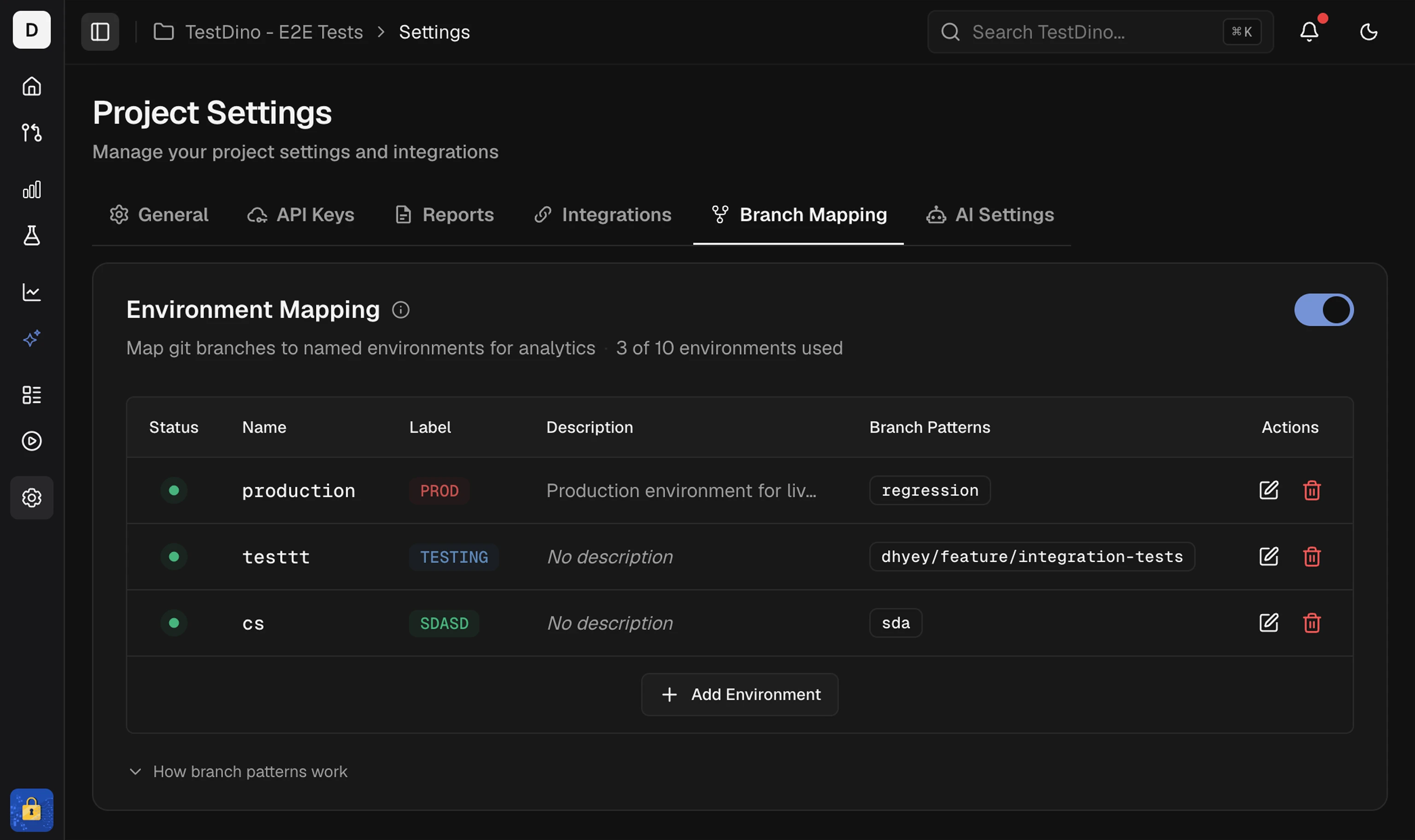 When you run tests with
TESTDINO_TOKEN set, TestDino reads the branch from git metadata and applies the matching pattern. No upload flag is required. See Project Settings → Branch Mapping for the UI fields.
Match order
TestDino checks environments in their row order in the Environment Mapping table. When patterns on 2 environments both match a branch, the first matching environment by row order wins. A new environment is added at the bottom of the table.Turn environment mapping on or off
Use the Enable environment mapping switch next to the Environment Mapping title. Turning it off removes the environment breakdown from analytics and keeps your configuration, so your mappings return when you turn it back on.Pattern types
A pattern is an exact branch name or a glob. Regex is not accepted. A pattern must match the whole branch name, and matching is case-sensitive.Exact match
Match the branch name exactly as written.
Use exact match for fixed names like
main, master, or production.
Glob patterns
To match
main or master, add both as separate patterns on the same environment.
Common patterns
Branch prefixes
Version numbers
Mixed casing
Matching is case-sensitive. Use a character class when casing is inconsistent, or add each spelling as its own pattern:Common use cases
Git Flow
Environment prefixes
Version releases
release/v[0-9]* also matches release/v1.0.0-rc1, so create Release Candidates and Beta before Production to keep them above it in the table.
Glob symbols reference
Allowed characters are
a-z, A-Z, 0-9, -, _, /, ., *, ?, [, and ].
Best practices
Do
Avoid
Validation
Errors (blocks saving):- Invalid characters: anything outside
a-z A-Z 0-9 - _ / . * ? [ ] **(use a single*)- Unbalanced
[ ]brackets - Duplicate branch pattern in the same environment or on another environment in the same project
Testing patterns
Example: dev/*
Example: release/v[0-9]*
Assign the environment
Results stream to TestDino during the run. The branch that triggered the run maps to an environment through the rules above, so no upload flag is needed. See the Node.js CLI for setup.
Project Settings
Configure branch mapping in the project
Node.js CLI
Stream results with branch metadata
GitHub Actions
CI workflow setup
Analytics
Filter dashboards by environment